Trac 1.4
Posted by
rs
on Mon 05 Apr, 2021 13:00:34 +0000
We have upgraded our platform to Trac 1.4. All projects have been upgraded and are running Trac 1.4.
All new projects from now on will be created using Trac 1.4.
We support 40+ plugins, and most of them should work as well.
Please do let us know if you have any issues.

Webhook Enhancements
Posted by
rs
on Fri 10 Apr, 2020 13:39:55 +0000
We’ve just made a few improvements to our webhooks
- Project changes as well as repository pushes are now available
- Support for Basic Authentication
- Create multiple webhooks for each project or repository
Our updated documentation has details on how to configure webhooks, and what JSON objects are passed during each call:
https://xp-dev.com/docs/user-guide/repositories/webhooks.html
Two Factor Authentication
Posted by
rs
on Fri 24 Jun, 2016 00:22:43 +0000
We’ve just made a release to support two factor authentication for your accounts. This is disabled by default, and you will have to enable it for your account using Google Authenticator.
Our documentation for two factor authentication has a guide on how to enable it for your account:
https://xp-dev.com/docs/user-guide/two-factor-authentication.html
This feature is only available on our new platform. We have begun migrating accounts over to our new platform, however, if you’d like it to be migrated earlier, just drop us a note. It is worth reading our new platform release notes as well:
SSL Certificates Renewed
Posted by
rs
on Wed 20 Apr, 2016 08:40:04 +0000
We’ve just renewed our SSL certificates on our old and new platform as well, as the existing ones were expiring. This is a pretty routine renewal, and most users will not notice any change.
However, if you are using an older Subversion, Git or Mercurial client, or if your CA certificate stores are not up to date, you may be asked to verify the certificate manually. In general, you should upgrade your client or fix your CA certificate store, but if you’d like to manually verify our new certificate fingerprints, they are below:
SHA1 Fingerprint: 61:D1:7D:11:44:B5:6B:D2:6F:C9:23:D2:54:1B:CF:44:01:C5:90:1E
SHA256 Fingerprint: 05:3D:36:22:27:40:23:44:8D:E8:48:7F:C7:14:54:42:22:B5:0A:79:02:80:BD:CF:7C:28:9B:69:AB:B9:19:A6
Git and Mercurial Branch and Tag Permissions
Posted by
rs
on Thu 14 Apr, 2016 08:26:32 +0000
We’ve just made a release our new platform where Git and Mercurial repositories now have branch and tag based permissions.
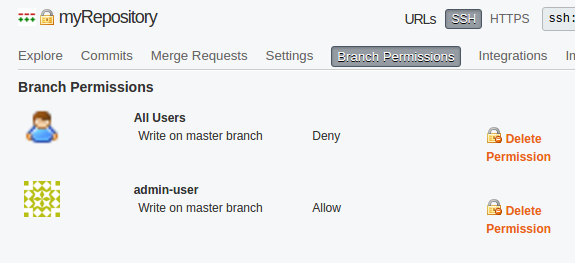
Branch based permissions are useful especially when you use merge requests to ensure that there are no accidental pushes into your main stable or release branch (normally master or HEAD). Moreover, you can ensure that tags are created by authorised members of your team.
Full documentation is available on:
https://xp-dev.com/docs/user-guide/repositories/branch-based-permissions.html
This feature is only available on our new platform. We will contact you about migrating your account, however, do raise a ticket if you’d like to get it migrated sooner.
2016 Platform Launch - Global Repositories and SSD Storage
Posted by
rs
on Tue 12 Apr, 2016 10:13:58 +0000
About a month ago (in March 2016) we did a soft launch on a new platform that we have been working on for months.
The new platform is a large infrastructure revamp, and has plenty of benefits. The biggest one is that you can have your projects and repositories in multiple locations worldwide on faster servers that have SSD storage.
To learn more about our new platform, you can head over to our platform release notes:
https://xp-dev.com/docs/2016-platform-notes.html
Additionally, you get your own base URL such as https://company.xp-dev.com where you can manage your own project, repository and user namespace. We even revamped our user administration, permissions and access level control, which is documented over on:
https://xp-dev.com/docs/user-guide/user-and-project-permissions.html
We have begun moving users over to the new platform, and we’ll contact you directly to plan a migration time slot in the coming weeks. However, if you’d like to migrate sooner, then please do just get in touch.
Importing and Exporting Trac Projects
Posted by
rs
on Mon 01 Jun, 2015 18:33:00 +0000
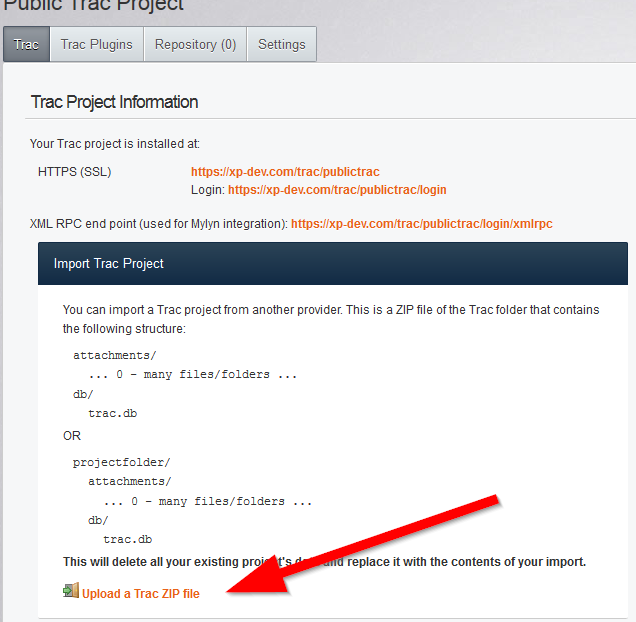
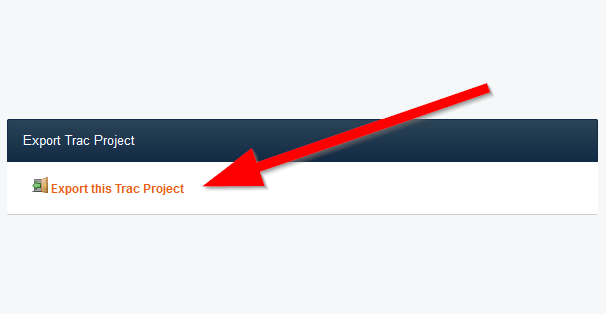
You can now import and export Trac projects on XP-Dev.com
If you’re a project owner or administrator, you will see two new options on your main Trac project page on our platform that allows you to import and export your Trac projects.
We have documented this on our documentation site, which includes screenshots:
Importing
Exporting
Main Platform Outage for 5 Hours on 14th Dec 2014
Posted by
rs
on Mon 15 Dec, 2014 03:37:36 +0000
We’ve just recovered from going down for 5 hours from around 10pm GMT on 14th December 2014 till 3am GMT.
At around 10pm GMT, we lost our MySQL database server due to both hard drives failing in our RAID1 array. This corrupted the partition’s filesystem to the point where it would have taken many hours to recover any data. Instead, we have reloaded our database from a nightly backup and will be restoring any missing data from our logs on disk.
Repositories and Trac projects are not affected. However, if you did create a new repository or project in the last 24 hours and do not see it in your account, please do contact us and we will restore it.
This has only affected our main platform – dedi instances are not affected.
XP-Dev.com and Poodle SSLv3
Posted by
rs
on Mon 20 Oct, 2014 01:29:39 +0000
Due to the recent POODLE SSLv3 exploit, we have disabled SSLv3 on all our servers (in favour for TLS).
Most web browsers will work seamlessly, however, there maybe a couple of older Subversion clients that do not support TLS. We recommend that you upgrade your client to a newer version that supports TLS.
Please do contact us if you have any issues.
Code Reviews and Merge Requests
Posted by
rs
on Fri 17 Oct, 2014 07:57:01 +0000
One of the most waited for feature on our platform has been code reviews. We’ve just implemented this using Merge Requests.
If your development workflow follows the Branch per feature/release and Merge model, then this will work extremely well for you.
All you have to do is head to your repository’s Merge Requests sub-tab and create a new request from there. Our platform will then show you the incoming changes, allow you to comment on it and even give you an option to do the merging for you.
The full user guide with screenshots is on our documentation site:
https://xp-dev.com/docs/user-guide/repositories/merge-requests.html
You can get email notifications whenever someone creates/updates a Merge Request or even comments on it. This is managed from your account’s notification subscription page:
https://xp-dev.com/docs/user-guide/notification-subscriptions.html
Even if you don’t use the Branch per feature/release and Merge model, you could potentially mark a dummy branch from where your changes are due to start, and use that branch as the *Target Branch in your merge request.
Please do bear in mind that this is just a beta release and only available for Git & Mercurial repositories. It is available on all accounts, both, paid and free.
Do give it a try, and let us know if you have any issues or feedback. We’ll be iterating over this quickly over the next couple of months, so, it will improve over time.
 Blog Archives
 Blog Entries